dartnative_shared_preferences
Simple key–value preferences for DartNative, with the familiar shared_preferences API, kept
in a fast memory-mapped store of its own. iOS and Android.
Why you'll like it
- Familiar API —
getInstance(), thengetString/setBool/ …, likeshared_preferences. - All the common types —
String,int,double,bool,List<String>. - Works from any isolate — no platform channel, so reads and writes work outside the main isolate, background tasks included, and a value one of them writes is seen by every other on its next read.
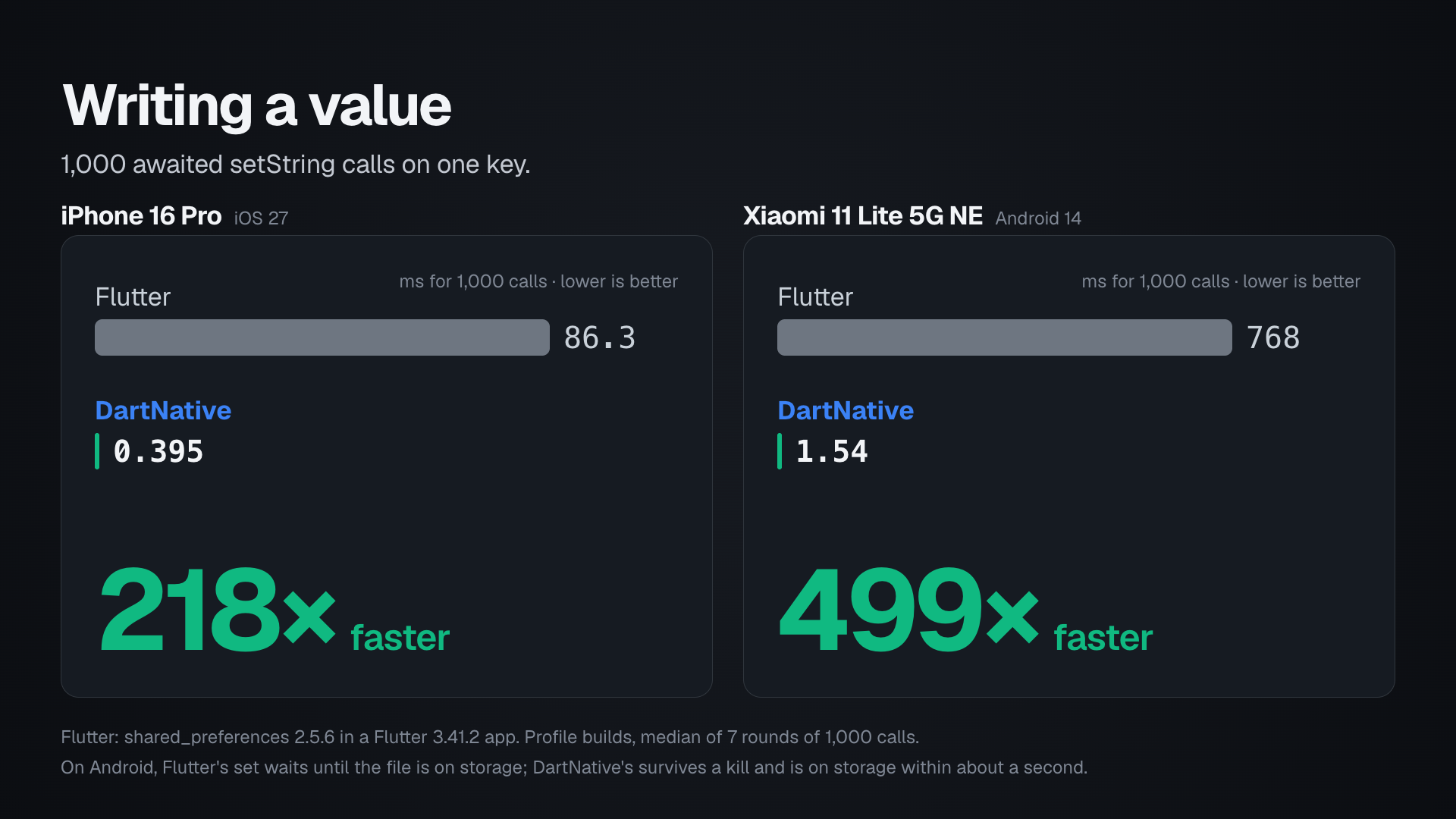
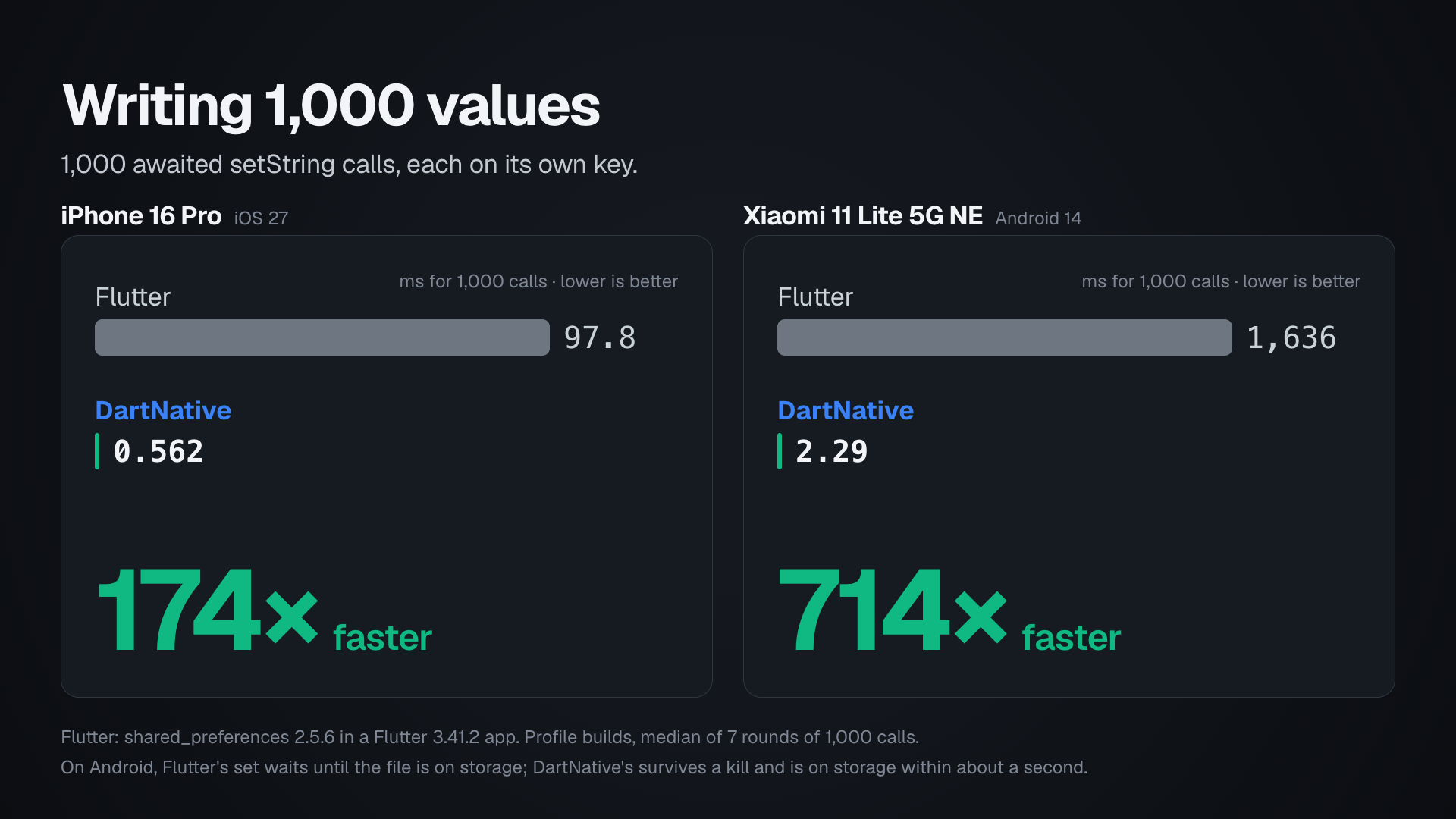
- Fast writes — a write takes about a microsecond, hundreds of times faster than Flutter's (iPhone, Android), and is kept even if the app is killed right after.
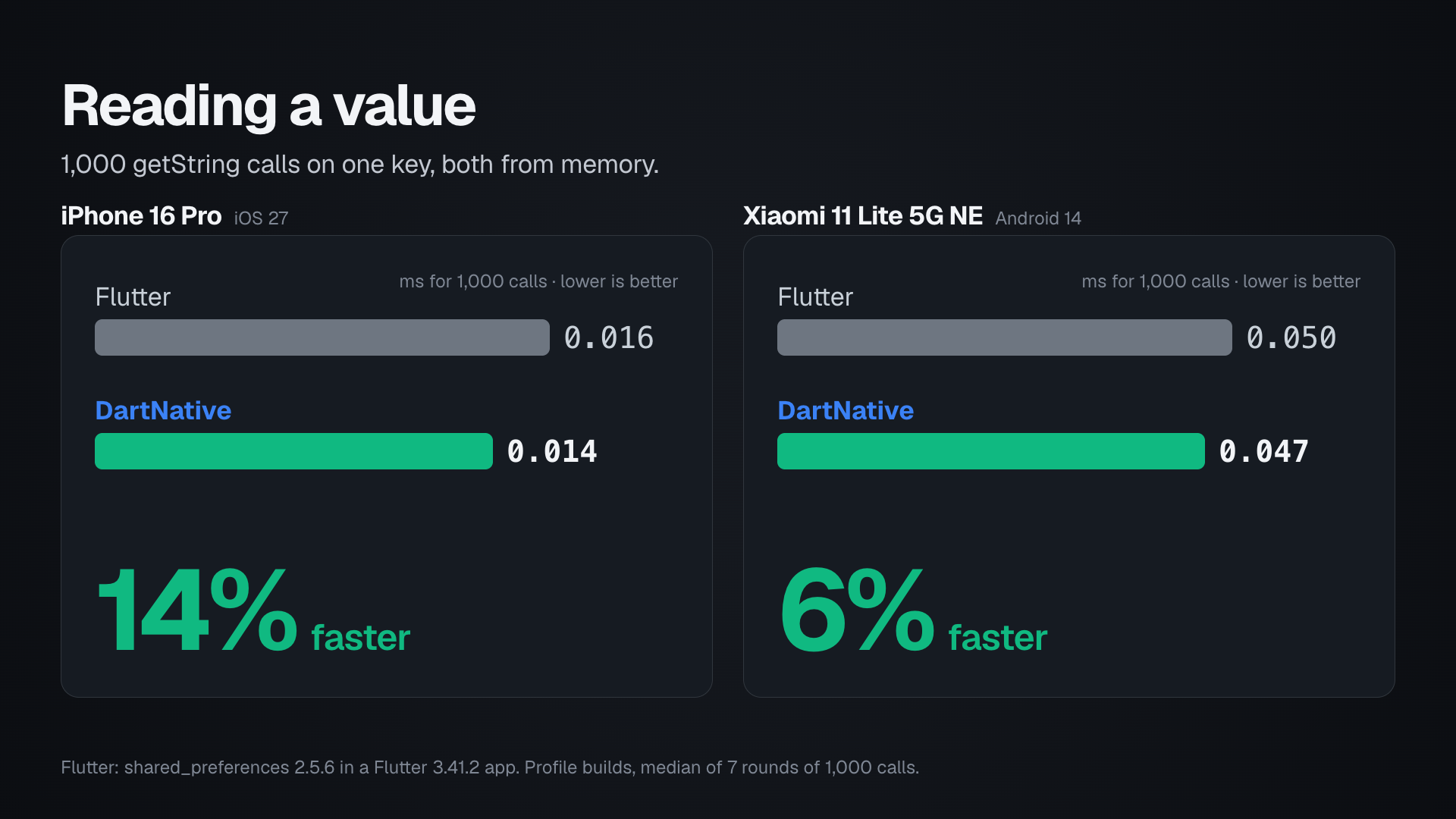
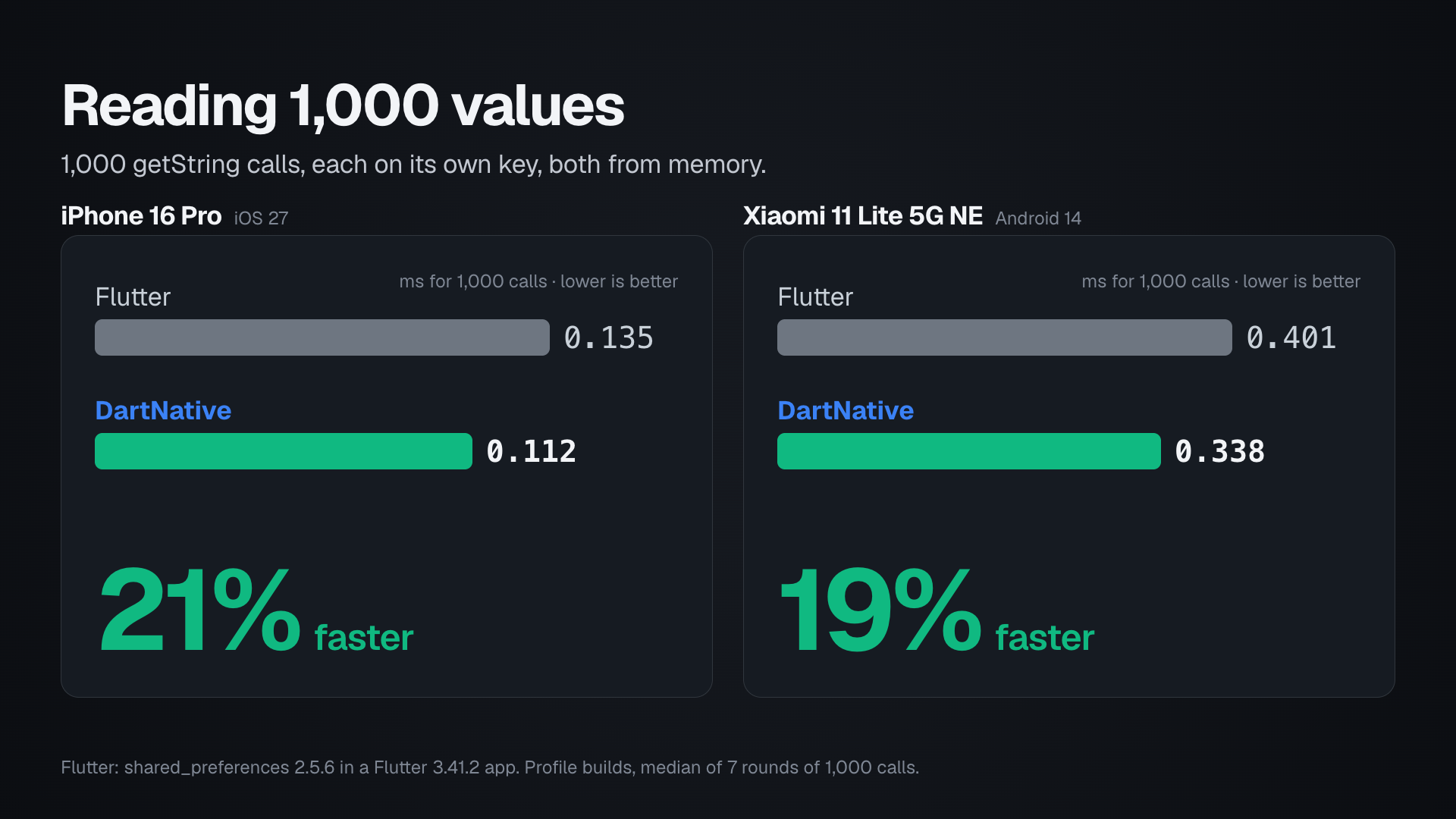
- Fast reads — as fast as Flutter's: each isolate reads from memory and still sees other isolates' writes.
- Safe counters —
incrementIntand theupdateXmethods change a value atomically across isolates. - Zero setup — nothing to configure on either platform.
- Keeps what your Flutter app saved — an app updated from its Flutter build reads the values Flutter's
shared_preferencesstored.
Highlights
SharedPreferences.getInstance()→ the store.getString/getInt/getDouble/getBool/getStringList(+containsKey).setString/setInt/setDouble/setBool/setStringList, plusremove/clear/reload.incrementInt/updateInt/updateDouble/updateBool/updateString/updateStringList— atomic read-modify-write, for a counter or a list that several isolates or background tasks change.
getKeys()(enumerate all keys) isn't available yet.
Install
dependencies:
dartnative_shared_preferences: ^1.1.0 # from dartpub.dev
dn pub get
void main() {
  DartNativePluginRegistrant.registerAll();
  runApp(const MyApp());
}
Quick look
import 'package:dartnative_shared_preferences/dartnative_shared_preferences.dart';

final prefs = await SharedPreferences.getInstance();

await prefs.setString('name', 'Ada');
await prefs.setBool('onboarded', true);

final name = prefs.getString('name');     // 'Ada'
final done = prefs.getBool('onboarded');  // true
Background tasks and isolates
Every isolate of the app — the UI isolate, Isolate.run workers, a background task — uses the
same store, and a value one of them writes is seen by every other on its next read, with no
reload(). When several of them change the same value, use the atomic updates: a getInt
followed by a setInt from two isolates at once can lose one of the two changes.
await prefs.incrementInt('syncs');                              // a counter
await prefs.updateStringList('log', (l) => [...?l, 'synced']);  // an append
The function given to an updateX may run more than once, when another isolate changed the
value in between, so it should only compute the new value.
Coming from Flutter
When your DartNative app ships as an update to a Flutter app with the same app
id, the first getInstance() brings over what Flutter's shared_preferences
saved, each value with its type: settings, flags, a user id, anything the app
kept there. It happens once; a value you remove afterwards stays removed, and
Flutter's copy is left in place so the Flutter build still works if you roll
back.
If your Flutter app called SharedPreferences.setPrefix, keep the call: it
tells the plugin where Flutter saved.
SharedPreferences.setPrefix('myapp.');          // before getInstance()
final prefs = await SharedPreferences.getInstance();
What SharedPreferencesAsync saved is brought over on Android. On iOS it
saved its keys without a prefix, among the app's other settings, so they come
over only when named; for an app that used only that API:
SharedPreferences.setPrefix('', allowList: {'token', 'onboarded'}).
Platform setup
iOS
No native setup required.
Android
No native setup required.
Fast, safe writes
Values are kept in a memory-mapped file, a mechanism built into iOS and Android: the file's
contents sit in memory that belongs to the operating system, not to the app, and the system
writes them to storage itself. A setX copies the value there before it returns. From that
moment the value is safe: nothing is lost if the app crashes, is closed from the app switcher,
or is suspended or stopped by the system. The store writes it to storage within about a
second, and at once when the app goes to the background.
The one event the system cannot cover is a sudden loss of power before the data is on
storage, which can lose the last second of writes. When a value must survive even that, call
reload() after the write: it returns once everything is on the device's storage, in a few
milliseconds.
Reads are a lookup in memory: 1,000 getString calls are 6% to 21% faster than Flutter's.
On an iPhone 16 Pro, 1,000 awaited setString calls take 0.40 ms, against 86 ms for
shared_preferences in a Flutter app on the same phone: 218 times faster. On a mid-range
Android phone, writes are 499 to 1,706 times faster; there, Flutter's plugin syncs every
write to storage before it returns, which this plugin does within about a second, or at once
on reload().
The benchmark is open source: the DartNative app and the Flutter app it was
measured with, every number, and the scripts to run both on your own phone
are in the DartNative repository's
benchmarks/shared_preferences/.
Example
The example/ app stores and reads a few settings — borrow from it freely.
Credits & license
API mirrors Flutter's
shared_preferences
(BSD-3-Clause); the plugin ships its own native code over FFI — a
memory-mapped store in C, the same on both platforms — built on the
DartNative framework's runtime (FFI loader, and the Android application
context).
First-party DartNative plugin, free to use in any DartNative app. Distributed through dartpub.dev; report issues on the plugin's page.