pinput_kit
Pin code / OTP input fields for DartNative, built on the native text field, with pluggable code strategies for autofill from SMS, push or any other source.
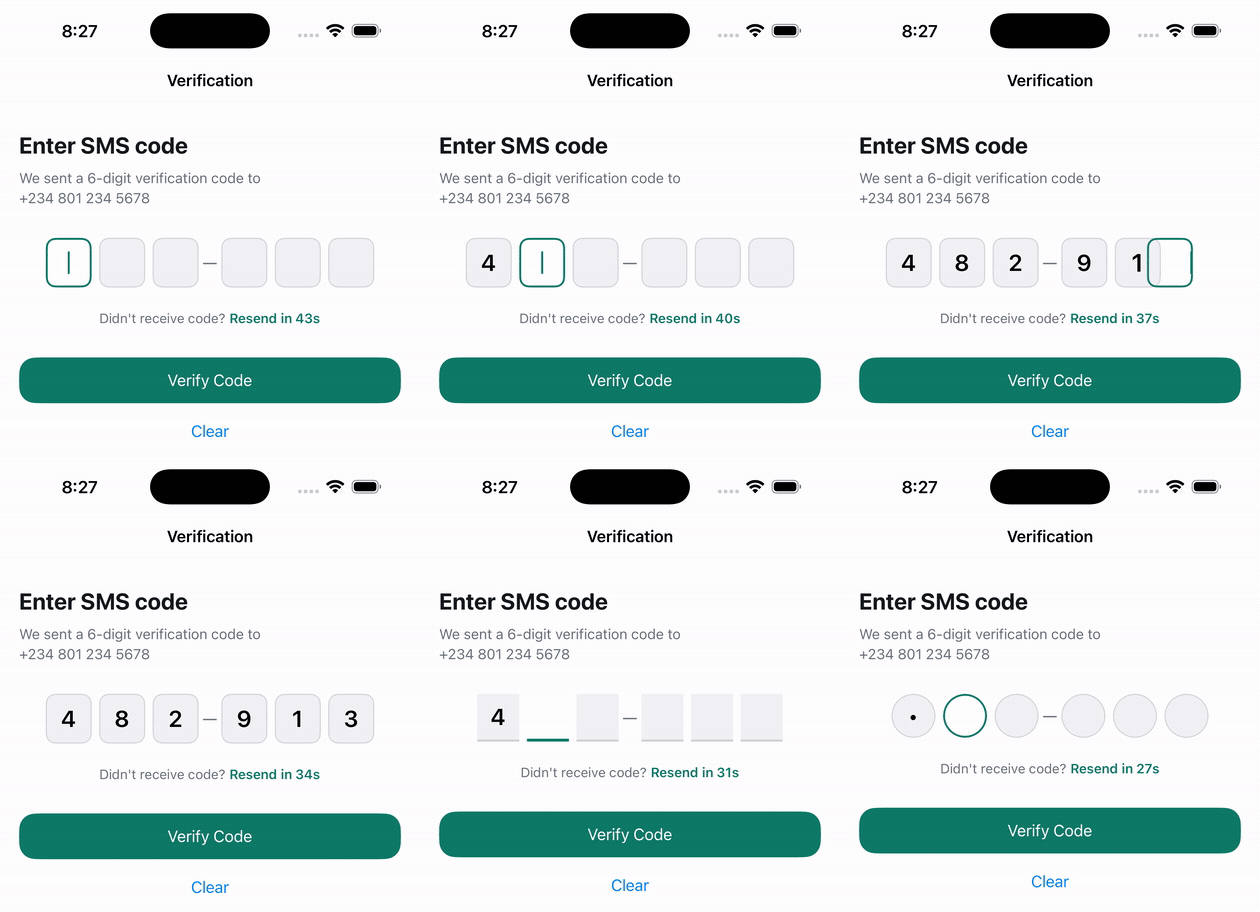
Why
DartNative ships a native TextField and nothing for segmented pin/OTP entry.
Developers are forced to either build multi-TextField rows (which break on
Android IMEs like Gboard and Samsung keyboard, swallow backspaces, break
clipboard paste, and fragment SMS autofill) or paint custom text boxes.
pinput_kit brings the industry-standard single-field overlay architecture
to DartNative: an underlying native TextField captures all keystrokes,
selection, and OS autofill, while composed slot boxes render each digit,
blinking cursor, and state transition.
Native to the core
- Single native input engine: The keyboard and clipboard interact directly
with UIKit's
UITextFieldor Android'sEditText. Backspace, paste, and keyboard traversal work 100% reliably. - Composed slot surfaces: Each slot is composed from
ContainerandText, matching either Apple's inset-grouped fill (PinThemeData.ios) or Material 3's outline (PinThemeData.material). - Smooth animations & peek: Digits can enter with fade or scale transitions.
Passcode fields support
peekDuration(briefly showing the digit before masking to bullet•). - A DartNative plugin: a small Swift/Kotlin side marks the native field as a one-time-code field and, on Android, listens for the verification SMS through Play services' SMS Retriever / User Consent APIs. No platform channels; FFI only, hot-restart safe.
- Form integration: Ships with
PinFormFieldthat plugs directly intoforms_kit'sFormAPI (validate(),save(),reset(),focusFirstInvalid()). Automatic validation waits until the pin is complete, so the slots do not turn red on the first digit. - Stable native field: The widget tree keeps one shape whether or not an error is shown, so the native text field is never remounted while typing.
- Tap a box to correct it: Tapping a filled slot selects that digit so the next key replaces it; tapping an empty slot or a gap continues at the end. The hidden native field sits behind the slots and never receives touches.
Install
Both packages are hosted on dartpub.dev, so declare the host:
dependencies:
  pinput_kit:
    hosted: https://dartpub.dev
    version: ^0.2.2
forms_kit comes in transitively and is re-exported; no separate dependency
or import is needed. dn pub get regenerates
lib/dartnative_plugin_registrant.dart so registerAll() loads pinput_kit's
native symbols; if that file was scaffolded before the generator added its
header line, delete it once and run dn pub get again.
Usage
Standalone PinField
import 'package:dartnative/dartnative.dart';
import 'package:pinput_kit/pinput_kit.dart';

PinField(
  length: 6,
  autofocus: true,
  onChanged: (pin) => print('Changed: $pin'),
  onCompleted: (pin) => verifyOtp(pin),
)
With forms_kit (PinFormField)
pinput_kit re-exports forms_kit's Form API, so one import covers Form,
FormState, AutovalidateMode and Validators:
import 'package:dartnative/dartnative.dart';
import 'package:pinput_kit/pinput_kit.dart';

final _formKey = GlobalKey<FormState>();

Form(
  key: _formKey,
  autovalidateMode: AutovalidateMode.onUserInteraction,
  child: Column(children: [
    PinFormField(
      length: 6,
      validator: (v) => (v == null || v.length < 6) ? 'Enter all 6 digits' : null,
      onSaved: (pin) => _otp = pin,
      onCompleted: (pin) {
        if (_formKey.currentState!.validate()) {
          _formKey.currentState!.save();
          signInWithOtp(_otp);
        }
      },
    ),
  ]),
)
Features
Validation timing
A length validator fails after the very first digit, so PinFormField does
not count a partial pin as a user interaction: with
AutovalidateMode.onUserInteraction (on the field or the enclosing Form)
the validator first runs automatically once all digits are in. An explicit
formKey.currentState!.validate() always runs it, so a submit button still
reports "Enter all 6 digits". Pass validateWhileIncomplete: true to validate
on every keystroke instead; AutovalidateMode.always validates on every build
regardless.
Focus ring, entry animations and success state
The active slot is marked by a single ring that slides to the next slot as you type (and back on delete), the way the platform's own code fields move. Filled slots keep the idle look, and once the code is verified every slot returns to it, so the only thing that ever stands out is where the next digit goes.
PinField(
  length: 6,
  focusAnimation: PinFocusAnimation.slide, // or .pop, .fade, .none
  focusAnimationDuration: const Duration(milliseconds: 220),
  focusAnimationCurve: Curves.easeOut,
  animationType: PinAnimationType.scale, // digit entry: .none, .fade, .scale
  animationDuration: const Duration(milliseconds: 160),
  animationCurve: Curves.easeOutBack,
  success: _verified,
)
focusAnimation picks how the ring moves: PinFocusAnimation.slide (default),
pop (appears at the next slot with a small overshoot), fade, or none
(instant jump). animateFocus: false switches back to each slot drawing its
own focused border. To outline filled or verified slots in their own colour, opt in on the
theme:
PinTheme(
  data: PinThemeData.platform.copyWith(
    highlightFilled: true,   // filled slots use filledColor
    highlightSuccess: true,  // success: _verified outlines slots in successColor
  ),
  child: ...,
)
A separator sits in a fixed cell (separatorWidth, default 16, plus the
theme spacing) so the ring lands exactly on each slot.
Slot styles: Box, Underline, Circle
Configure the slot geometry via PinThemeData.style:
PinField(
  length: 6,
  theme: PinThemeData.platform.copyWith(
    style: PinSlotStyle.underline, // or .box, .circle
  ),
)
Slot size
Each slot's box size and the gap between slots come from the theme.
PinThemeData.platform (and .ios, .material) carry sensible defaults;
override just the values you need:
PinField(
  length: 6,
  theme: PinThemeData.platform.copyWith(
    width: 48,   // slot width
    height: 56,  // slot height
    spacing: 10, // gap between slots
  ),
)
To size every field in a subtree at once, wrap it in PinTheme instead of
passing theme: to each field (see "Theming" below). A slotBuilder sizes
its own widget and ignores these values.
Group separators
Insert separator widgets (e.g. a dash or space) between digit groups:
PinField(
  length: 6,
  separator: const Text('—', style: TextStyle(color: Colors.grey)),
  separatorPositions: const [3], // Renders: 123 — 456
)
Passcode masking & Peek
Mask input for security PINs with an optional peek duration:
PinField(
  length: 4,
  obscureText: true,
  obscureCharacter: '●',
  peekDuration: const Duration(milliseconds: 600), // Real digit shows 600ms then masks
)
SMS autofill on Android (SmsRetrieverPinStrategy)
final controller = PinEditingController(
  pinLength: 6,
  strategies: [
    if (SmsRetrieverPinStrategy.isSupported) SmsRetrieverPinStrategy(),
  ],
  onCodeReceived: (code) => verifyOtp(code),
);
SmsRetrieverMode.retriever(default): no permission, no prompt. The SMS must end with the app's 11-character hash, available at runtime asSmsRetrieverPinStrategy.appSignature(one value per signing certificate, so debug and release differ). Give it to whoever sends the SMS.SmsRetrieverMode.userConsent: any SMS with a 4–10 digit code; Android shows a one-tap consent prompt first.- Play services listens for five minutes per start; call
controller.startListening([...])again from a "resend" action. - Needs Google Play services on the device. On iOS
isSupportedis false and the strategy fails quietly; the controller keeps listening to the others.
One-time-code keyboard hint
PinField marks its hidden native field as a one-time-code field
(UITextContentType.oneTimeCode on iOS, the smsOTPCode autofill hint on
Android), so the iOS QuickType bar and Android autofill offer a code from an
incoming SMS. Turn it off with oneTimeCodeHint: false for passcodes that
never arrive by SMS.
Code strategies (PinEditingController)
Inspired by surfstudio/flutter-otp-autofill, pinput_kit supports the Strategy Pattern for auto-populating verification codes from any asynchronous source (an SMS listener you provide, push notification, websocket, or test mock):
final controller = PinEditingController(
  pinLength: 6,
  strategies: [
    // Integration / local testing strategy
    TestPinStrategy(code: '123456', delay: Duration(seconds: 2)),
    // Or custom push-notification / SMS stream
    StreamPinStrategy(myPushNotificationStream),
  ],
  onCodeReceived: (code) => print('Autofilled code: $code'),
);

PinField(
  controller: controller,
  length: 6,
)
The controller extracts the digits from a full message body with
extractPinCode (e.g. "Your Tharwa code is 123456. Valid for 5 min." ->
123456, and "code 123-456" -> 123456). It only accepts a stand-alone run
of exactly pinLength digits, so a phone number, order id or date in the
message is never mistaken for the code. Pass parser: for a custom rule.
When a code arrives, or the controller is disposed, every strategy receives
stopListening() so it can cancel its platform subscription.
SmsRetrieverPinStrategy is the built-in Android listener; iOS has no SMS
API and relies on the one-time-code keyboard suggestion above.
Custom slot builder
For bespoke animations, custom borders, or badges, pass a slotBuilder:
PinField(
  length: 6,
  slotBuilder: (context, details) {
    return AnimatedContainer(
      duration: const Duration(milliseconds: 200),
      width: 48,
      height: 54,
      decoration: BoxDecoration(
        color: details.state == PinSlotState.focused
            ? Colors.blue.withOpacity(0.1)
            : Colors.transparent,
        border: Border.all(
          color: details.state == PinSlotState.error ? Colors.red : Colors.grey,
        ),
      ),
      child: Center(
        child: Text(
          details.character ?? '',
          style: const TextStyle(fontSize: 22, fontWeight: FontWeight.bold),
        ),
      ),
    );
  },
)
Themes
PinTheme(data: PinThemeData.ios | .material | .platform | custom) sets default
slot dimensions, colours, and typography for a subtree.
PinTheme(
  data: PinThemeData.platform.copyWith(
    focusedColor: const Color(0xFF0F7A69),
    borderRadius: 12,
  ),
  child: myPinScreen,
)
Platform behaviour to expect
- Keyboard: With
autofocus: truethe keyboard opens as soon as the field mounts. It closes automatically when the last digit is entered (closeKeyboardWhenCompleted). - Paste: A pasted code goes through the same digit-only and length
formatters as typed input, filling all slots at once and firing
onCompleted. - Correcting a digit: Tap the box, type the new digit.
onCompletedfires again whenever a change leaves the pin complete, so a corrected code is re-submitted. - iOS one-time-code suggestion: When an SMS with a code arrives, the
QuickType bar offers it; tapping fills all slots and fires
onCompleted. - Android:
SmsRetrieverPinStrategyfills the code without any tap. Independently, Gboard may offer the code as a chip thanks to the autofill hint. - Haptic feedback: Keystrokes trigger subtle haptic clicks on supported
devices via
HapticFeedback.lightImpact().
Example
example/ is a runnable DartNative app with an OTP verification screen and live
style switcher:
cd example
dn pub get
dn run -d <device-id>
Native layout
android/  build.gradle.kts, PinputKitPlugin.kt (loads libpinput_kit.so),
          PinputKitBridge.kt (SMS Retriever / User Consent, app hash,
          autofill hint), cpp/pinput_kit.cpp (FFI entry points + JNI)
ios/      pinput_kit.podspec, Classes/PinputKit.swift (@_cdecl entry points)
Dart looks the symbols up in PinputKitFFIBindings.loadSymbols(), called by
the generated registrant. Android events reach Dart through one dispatcher
pointer guarded by the framework's restart counter; iOS needs no callbacks.
Development
dn pub get --no-example   # resolves dartnative from installed SDK
dart analyze lib test
# VM tests (parser, strategies, validators); `dart test` at the root re-runs
# pub against pub.dev, which does not know dartnative, so run the files directly:
for t in test/*_test.dart; do dart --packages=.dart_tool/package_config.json "$t"; done
Set pinputKitDebug = true to print focus changes, rebuilds and lifecycle
steps with timestamps.
Licence
MIT License. Copyright (c) 2026 Kluivert.